Back to School Admission Design Kit
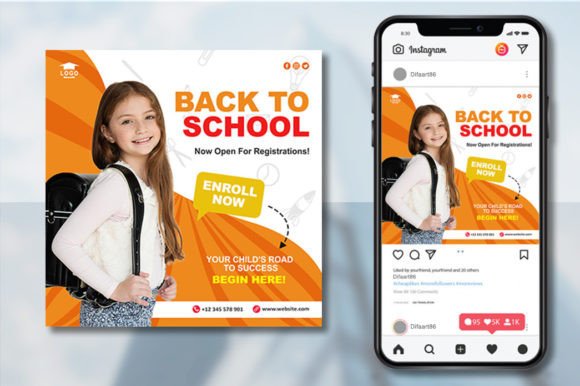
Back to School Admission isn’t just a seasonal trend—it’s a strategic creative opportunity. Whether you’re launching a new academic program, welcoming students to an online course, promoting a tutoring service, or supporting a community learning initiative, this design kit gives you a professional, adaptable foundation that saves time without sacrificing originality.
What Makes This Back to School Admission Kit Practical?
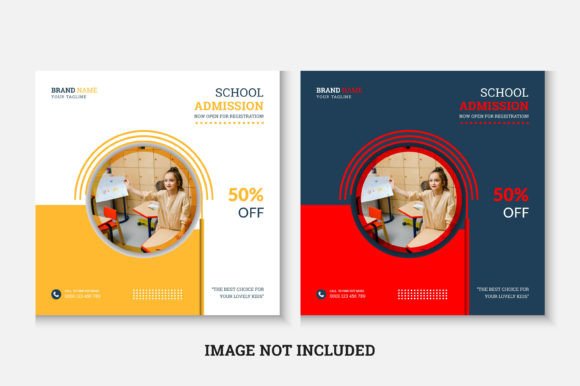
This isn’t a generic template with placeholder text and rigid layouts. It’s built for real-world use: 1080×1080 pixels (ideal for Instagram posts, Facebook covers, Pinterest pins, and digital newsletters), RGB color mode (ready for screen display), and fully editable in Adobe Illustrator CS6 or newer. The AI and EPS file formats mean you can scale infinitely, adjust layers precisely, and integrate cleanly into existing brand workflows.
The Roboto Slab font—clean, readable, and subtly authoritative—is pre-installed in the file and linked for easy download if you need to reinstall or share with a team. No licensing surprises. No hidden assets. Just structure, flexibility, and clarity.
Creative Possibilities—Beyond the Obvious
Think beyond “first day of class” graphics. A well-designed Back to School Admission asset can serve multiple goals:
- Educators can adapt it for welcome emails to new cohort members—swap in school colors, add a QR code linking to orientation materials, and insert a short instructor bio.
- Online course creators use it as a launch banner for a limited-time enrollment window—replace the headline with urgency-driven copy (“Enrollment Closes Friday”) and overlay a subtle gradient to highlight the CTA button area.
- Small tutoring studios customize it for neighborhood flyers—add local landmarks in the background (using your own imagery), adjust spacing to fit a physical print margin, and include a phone number in bold, legible type.
- Nonprofits and community centers reinterpret it for inclusive messaging—change icons to reflect accessibility features (e.g., sign language, screen reader symbols), adjust contrast for readability, and translate key lines into bilingual versions.
Because the file is layered and labeled, you’re not guessing which shape controls the headline versus the subtitle. You’re not wrestling with locked raster elements. You’re working with intentional structure—so creativity stays focused on meaning, not mechanics.
How to Customize Without Losing Impact
Customization is only useful if it strengthens communication—not dilutes it. Start with purpose: What action should the viewer take? Who needs to feel seen in this message? Where will it appear?
For social media, keep text concise. Instagram users scroll fast—so limit headlines to six words or fewer, and use the bottom third of the canvas for clear CTAs like “Register Now” or “Download Syllabus.” On email headers or landing pages, you have more space—use that to reinforce trust: add a small logo lockup, accreditation badge, or student testimonial snippet in a secondary layer.
Color adjustments are powerful but simple: swap the base palette using Illustrator’s Recolor Artwork tool. Want warmth? Shift blues toward teal and add amber accents. Need authority? Deepen navy tones and pair with crisp white typography. Avoid overloading—stick to one primary color, one accent, and neutral backgrounds unless your brand demands bolder expression.
Realistic Use Cases Across Platforms
A freelance graphic designer used this Back to School Admission kit to deliver five distinct social posts for a K–8 charter school—all in under two hours. She changed fonts only where needed (keeping Roboto Slab for headlines, switching to Open Sans for body copy in email variants), reused icon positions across formats, and maintained consistent spacing between elements so the series felt unified, not repetitive.
A university communications officer adapted the layout for LinkedIn by resizing to 1200×627, adding a subtle campus photo as a backdrop layer (blended at 15% opacity), and rewriting the subhead to speak to adult learners: “Start Your Degree—On Your Terms.” The core structure remained intact; the audience focus shifted.
An edtech startup repurposed the template for a series of animated stories on Instagram. They kept the same layout but exported individual layers as PNGs—headline, icon, background—and animated them sequentially using CapCut. The result? A dynamic, branded sequence that performed 3x higher than static posts.
Maintaining Consistency While Staying Fresh
Consistency doesn’t mean repetition—it means recognizable intent. Use the same spacing system (e.g., 24px between headline and subhead, 48px before CTA) across all versions. Keep icon styles aligned (line weight, corner radius, fill behavior). If you introduce photography, apply the same brightness/contrast preset each time.
Originality comes from context, not complexity. A handwritten note added digitally beside the main headline? That’s personal. A student-drawn mascot scanned and placed in the corner? That’s authentic. A single line of poetry about learning, set in italics beneath the CTA? That’s memorable—because it’s human.
Support That Fits Real Workflows
The included Help Information file walks through layer naming conventions, safe zones for text placement, and common export settings—not theoretical best practices, but what actually works when you’re editing at 9 p.m. before a deadline. If you hit a snag—say, a missing font warning or unexpected clipping mask behavior—the support team responds within one business day. No ticket numbers. No scripted replies. Just direct help from designers who’ve used this kit themselves.
You don’t need to be an Illustrator expert to use it—but if you want to go deeper (e.g., scripting batch exports or building a multi-language version library), the clean vector structure makes those next steps possible, not prohibitive.
Why This Works for Your Audience—Not Just Your Calendar
Back to School Admission moments happen year-round now. Micro-credentials launch in March. Coding bootcamps open cohorts every six weeks. Homeschool collectives form new groups in October. Your design toolkit shouldn’t tie you to August—it should empower responsiveness.
This kit meets that need because it’s built on constraints that serve clarity: fixed dimensions for platform compatibility, intentional whitespace for breathing room, and typographic hierarchy that guides attention—not competes with it. It doesn’t shout. It invites. And that’s how meaningful engagement begins.