Back to School Flat Lay Mockup: Simple, Smart, and Ready to Showcase Your Designs
When August rolls around and classrooms begin to buzz with fresh energy, designers, educators, and small-business owners all start preparing for one of the year’s most visual seasons: back to school. Whether you’re launching a new line of printable planners, designing custom teacher resources, or offering downloadable study kits, how your digital files appear matters — a lot. That’s where a Back to School Flat Lay Mockup steps in: not as a flashy 3D render or layered PSD, but as a clean, realistic, instantly usable JPEG that puts your work front and center.
What Exactly Is This Back to School Flat Lay Mockup?
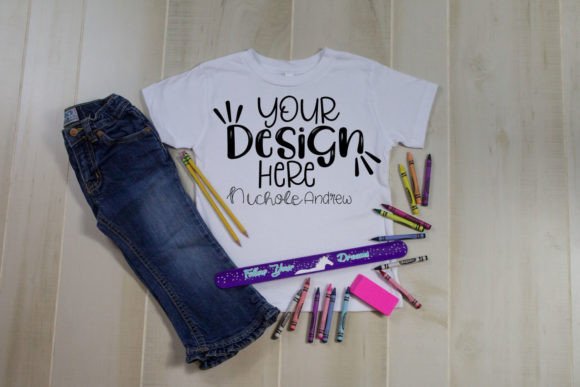
This particular Back to School Flat Lay Mockup features a crisp white t-shirt laid flat against a soft, neutral background — surrounded by carefully arranged school supplies: a spiral notebook with visible lined pages, a set of colored pencils, a stack of index cards, a pair of reading glasses, and a coffee mug with steam rising (a subtle nod to early-morning lesson prep). The lighting is even and natural. Shadows are soft but intentional. Nothing distracts from the central element: the t-shirt.
Crucially, this isn’t a PSD smart mockup. There’s no layering, no smart object replacement, no complex blending modes to master. You’ll receive a single high-resolution JPEG file — ready to open in any image editor, from Canva and Photoshop to Affinity Photo or even Google Slides.
How It Works: Overlay in Seconds, Not Hours
Using the Back to School Flat Lay Mockup is refreshingly straightforward:
- Open the provided JPEG in your preferred design tool.
- Create a new layer above it and place your own design — say, a “First Day of School” quote or a subject-themed graphic — sized to fit naturally on the t-shirt area.
- Adjust blend mode (if needed) to “Multiply” or “Normal,” depending on your file’s background. Since the t-shirt is white, designs with transparent or white backgrounds integrate seamlessly.
- Export your final image as a JPEG or PNG — ready for Etsy listings, Instagram posts, email newsletters, or your online store.
No plugins. No tutorials. No trial-and-error with perspective grids. Just clarity, consistency, and speed.
Why Simplicity Wins in Real-World Design Workflows
Many creators assume they need advanced mockups to look professional — but complexity often backfires. A designer juggling five product launches before Labor Day doesn’t have time to troubleshoot clipping masks or match lighting angles across three layers. They need reliability. Predictability. And visual cohesion across every platform.
That’s why this Back to School Flat Lay Mockup shines in fast-paced environments:
- Etsy sellers use it to display printable class schedules without showing blank PDF thumbnails — customers instantly grasp how the file looks *in context*.
- Teachers building TpT stores overlay lesson plan covers onto the t-shirt, pairing them with real-world classroom props (notebooks, sticky notes, highlighters) to signal practicality and readiness.
- Small studios launching branded merch preview their typography-driven “Math Is My Superpower” or “Future Scientist” slogans — not on a generic mannequin, but on something tactile, relatable, and seasonally resonant.
The t-shirt acts as both a canvas and a cue: it signals casual learning, approachability, and everyday use — far more than a sterile studio backdrop ever could.
Real Benefits You’ll Notice Right Away
It’s not just about convenience. Using this Back to School Flat Lay Mockup delivers measurable advantages — especially if you’re selling digital products or promoting educational content.
Stronger Visual Trust
Customers don’t buy files — they buy outcomes. When your planner appears on the t-shirt beside a notebook and pencil, it silently communicates: This is made for real students, real teachers, real routines. That implied authenticity builds trust faster than bullet points ever could.
Faster Social Engagement
Instagram and Pinterest reward clear, scannable visuals. A clutter-free flat lay with intentional negative space stops the scroll. Add a short caption like “Printable Study Tracker — ready for your first week,” and you’ve got a post that converts because it feels helpful — not salesy.
Consistent Branding Across Channels
Use the same Back to School Flat Lay Mockup for your website banner, email header, and Facebook ad. Even though each design overlay is different, the consistent layout, lighting, and prop styling create subconscious continuity. Your audience begins to recognize your visual rhythm — and that recognition builds recall.
What to Keep in Mind Before You Download
Because this is a JPEG-based mockup — not a layered PSD — there are a few practical considerations worth noting upfront:
- Resolution matters. The file arrives at 4000×3000 pixels (300 DPI), so it scales beautifully for web and print. But avoid stretching your design beyond the t-shirt’s natural boundaries — the edges are softly blurred to mimic fabric texture, and overextending will break realism.
- Backgrounds should be transparent or white. Since the t-shirt is pure white, overlays with solid-colored backgrounds (especially black or navy) may require a quick “Multiply” blend mode to knock out the white and let the shirt show through cleanly.
- Props aren’t editable — and that’s intentional. You won’t change the notebook’s color or reposition the glasses. But that limitation is actually a strength: it keeps your focus on your design, not on curating props. Think of the layout as a trusted stage — your content is the star.
When This Mockup Fits Best (And When to Look Elsewhere)
This Back to School Flat Lay Mockup excels when your goal is clarity, speed, and seasonal relevance — especially for digital downloads, minimalist branding, or educator-focused offerings. It’s ideal if you value:
- Zero learning curve
- Mobile-friendly previews (great for sharing via WhatsApp or text)
- A cohesive aesthetic across multiple products
- Subtle storytelling — no text needed, just thoughtful composition
It’s less suited for highly technical presentations (e.g., showing fabric weave detail or garment fit), animated social posts, or projects requiring dynamic angles (like overhead-to-45° transitions). If those are your needs, a multi-angle PSD or video mockup might serve you better — but for 90% of back-to-school digital product launches? This JPEG-based flat lay hits the sweet spot between polish and practicality.
Final Thought: Less Tool, More Message
In a world overflowing with design tools, templates, and automation, the most powerful assets are often the simplest ones — the ones that get out of your way. This Back to School Flat Lay Mockup doesn’t ask you to become a retoucher or lighting expert. It asks only that you bring your idea — your worksheet, your quote, your curriculum guide — and lets it land with warmth, intention, and quiet confidence.
Back to school isn’t just about supplies. It’s about readiness. Clarity. A fresh start. Let your visuals reflect that — clearly, calmly, and completely.