Back to School Globe Outline Icon: A Practical Asset for Educators and Designers
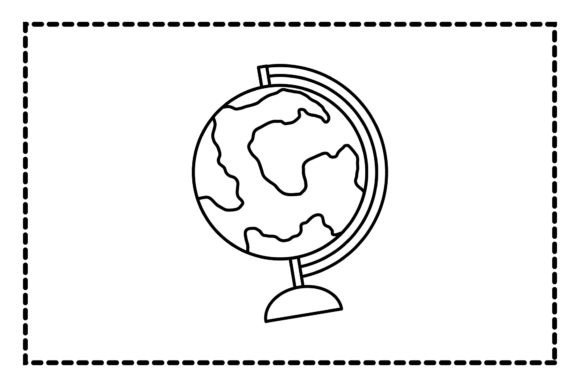
Icons carry meaning at a glance—especially in education, marketing, and digital communication. The Back to School Globe Outline Icon stands out not for novelty alone, but for its clear conceptual alignment: a globe outline paired with back-to-school intent signals global learning, inclusivity, academic readiness, and interconnected knowledge. Unlike decorative or overly stylized alternatives, this icon prioritizes legibility, scalability, and cross-platform compatibility—qualities that matter when time, consistency, and clarity are non-negotiable.
What You Actually Receive—and Why Format Variety Matters
This asset delivers six distinct file formats on a consistent 1920px × 1280px canvas: one AI (Adobe Illustrator), one EPS, one DXF, one JPG, one PNG, and—critically—one editable vector source. That’s not just redundancy; it’s workflow flexibility. Designers using Adobe Creative Cloud benefit from the AI file’s layered structure and editable paths. Print production teams rely on EPS for reliable RIP processing. CNC or laser-cutting workflows need the precision of DXF. Meanwhile, JPG and PNG files serve immediate web or presentation use—PNG for transparent backgrounds in slide decks or social banners, JPG for fast-loading email headers or blog thumbnails.
The uniform canvas size simplifies batch integration. Whether you’re building a series of classroom posters, updating a school district’s website banner, or preparing a vendor kit for an edtech startup, knowing every version scales predictably reduces trial-and-error resizing and maintains visual harmony across touchpoints.
Design Integrity and Real-World Legibility
The outline style—clean, medium-weight strokes, balanced negative space, no fill—ensures readability at small sizes (e.g., 32px favicons or mobile app buttons) and impact at large ones (e.g., 48" trade show graphics). It avoids fine interior details that blur or collapse when scaled down, and it sidesteps gradients or shadows that complicate reproduction across devices or print methods. Tested across common display environments—including projectors in dimly lit classrooms and low-resolution internal LMS interfaces—the icon remains identifiable without labels.
Color neutrality is another strength. As a pure outline, it adapts seamlessly to brand palettes: pair it with navy for a university newsletter, coral for a children’s literacy nonprofit, or monochrome for accessibility-compliant materials. No recoloring workarounds are needed—just select stroke color in vector editors or apply CSS filters in web contexts.
Who Benefits Most—and Where It Fits Naturally
Educators and curriculum designers use this icon to signal international units, geography modules, or global citizenship themes—without resorting to clichéd clipart. A middle school teacher embedding it into a Google Slides unit opener adds instant context; a university faculty developer placing it beside “Study Abroad Opportunities” on a departmental webpage reinforces intent without text overload.
Small business owners in tutoring, educational publishing, or online course creation find value here too. An independent ESL instructor launching a “Global English Prep” course can feature the icon on landing pages, email signatures, and printable progress trackers—creating visual continuity across fragmented customer touchpoints. Similarly, a micro-publisher releasing bilingual workbooks uses it as a unifying motif across cover designs, interior chapter headers, and promotional PDFs.
Marketing and communications professionals working with schools, districts, or edtech platforms appreciate its semantic precision. Unlike generic “school” icons (e.g., apples or mortarboards), the globe outline implies scope beyond local context—it subtly supports messaging around diversity, remote learning, or cross-border collaboration. When paired with data visualizations or infographics about student mobility or language acquisition trends, it functions as both identifier and conceptual anchor.
Practical Considerations and Minor Limitations
This isn’t a full icon set—it’s a single, focused asset. Users expecting variations (e.g., filled versions, alternate angles, or seasonal overlays like graduation caps or backpacks) will need to adapt or supplement. While the outline format ensures versatility, it also means the icon doesn’t inherently convey tone: warmth, urgency, or playfulness must be added through typography, layout, or adjacent imagery—not the icon itself.
Also worth noting: the DXF file targets fabrication workflows, not graphic design software. If your team lacks access to CAD tools or CNC equipment, that file may remain unused—though its inclusion reflects thoughtful audience anticipation rather than bloat. Similarly, the EPS version, while widely supported, is less essential for modern web-first teams relying primarily on SVG or PNG exports—but remains valuable for legacy print vendors or institutional IT departments with standardized prepress pipelines.
Editing Workflow and Long-Term Usability
The AI file is where customization begins. Paths are ungrouped and named logically (e.g., “Globe_Circle”, “Meridian_Lines”), making selective adjustments straightforward—tighten stroke weight for sharper small-scale use, extend latitude lines for emphasis, or isolate the globe shape to combine with custom typography. No embedded fonts or raster effects mean no missing assets or rendering surprises across machines.
Because all formats originate from the same vector source, updates propagate cleanly. Need a version with simplified meridians for younger audiences? Edit once in AI, then re-export all six formats—preserving naming conventions and metadata. That repeatability supports version control and archival integrity, especially important for institutions maintaining branded resource libraries over multiple academic years.
When This Icon Fits—and When to Look Elsewhere
Choose the Back to School Globe Outline Icon if your priority is clean, scalable, semantically accurate representation of global education themes—and if your projects span digital, print, and physical media. It excels in contexts where consistency, accessibility, and professional polish matter more than stylistic flair.
It’s less ideal if you need rapid animation (no SVG or Lottie variants included), require multilingual label integration (the icon itself contains no text), or work exclusively within constrained ecosystems that mandate specific file types not covered here (e.g., Figma .fig native files or Sketch symbols). In those cases, consider whether manual conversion—or pairing this icon with complementary assets—is more efficient than seeking an all-in-one solution.
Ultimately, the Back to School Globe Outline Icon earns its place not through novelty, but through quiet reliability: it does one thing well, supports real-world production demands, and integrates without friction into workflows that prioritize substance over spectacle. For educators designing learning experiences, marketers communicating academic value, and creators building trustworthy educational brands, that kind of dependable utility is rarely overrated.